Agent Workspace: one place for every channel
Anyone starting out in support knows the old picture: one window for the mail inbox, one for chat, one for the phone system, and the customer data somewhere in between. Every channel its own tool, every switch a loss of context. The Agent Workspace clears that up. It’s the surface an agent works in today. The idea behind it is plain: one workspace for every channel.
What the Agent Workspace is
The Agent Workspace pulls the different contact channels into a single view. In practice, these come together here:
- Email: the classic ticket channel.
- Chat and messaging: web messaging on your own site, plus social messaging via WhatsApp, Facebook Messenger, Instagram DM, X (Twitter) DM, LINE and WeChat.
- Voice: calls through the built-in telephony, with a call console right inside the ticket.
The core of it: no matter which channel a customer started on, the agent doesn’t have to switch back there. She answers in the same window and, where it fits, can switch channels without losing the thread.
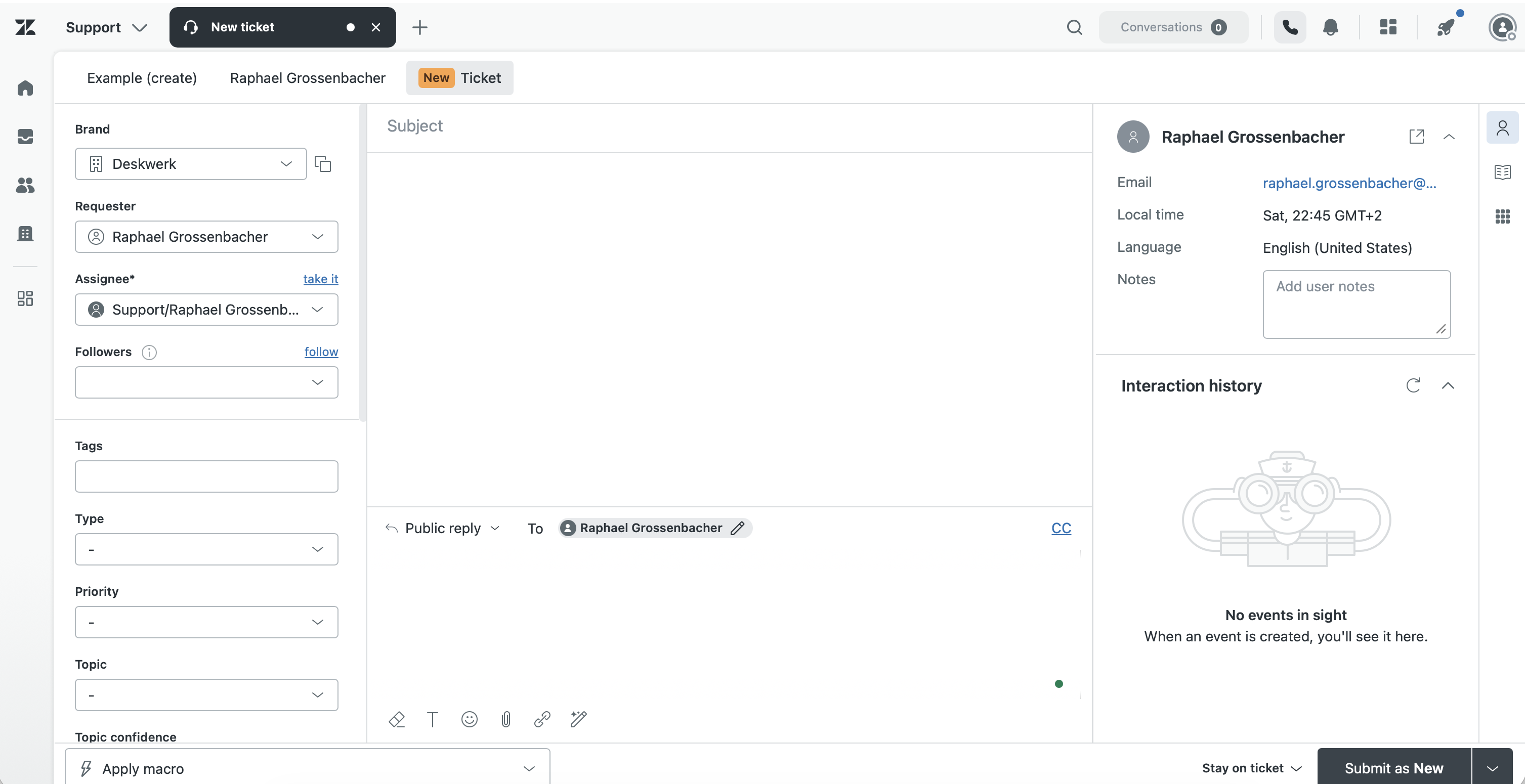
The parts that matter most
The surface has a clear layout. Understand these three areas and you’ll find your way around:
The conversation view (middle). This holds the history: every message in order, old to new, regardless of channel. A filter at the top switches between All, public messages and internal notes. During an active call, the call console appears at the top as well.
The composer (bottom). The reply field separates two things beginners tend to mix up: the public reply, which reaches the customer, and the internal note, which only the team sees. That distinction is the single most important move in the daily work. Pick the wrong one and an internal remark goes out the door.
The context panel (right). The right column pulls together several modes you switch between. Which of them are shown is set by the administration. The most important:
- Customer context: who this is, which tickets came before, where the request is coming from.
- Knowledge: its own mode that shows Help Center articles next to the conversation.
- Side conversations: side threads for bringing in a third party (more on that shortly).
- Related tickets and Tasks: related cases and tasks tied to the ticket.
- Apps: the apps sidebar with extra tools, such as custom objects or other installed apps.
Knowledge is its own mode, not part of the apps sidebar. That’s the most common misunderstanding during onboarding.
A word on data protection: the customer context can also show Device Information, meaning IP address and approximate location. Under the revDSG, that counts as personal data. Set up the context panel deliberately and show only what the team needs to do the work.
The side conversations deserve a closer look: the side threads you use to bring in a third party in parallel, without leaving the customer’s history, say to check with a supplier by email. They come in four forms: as an email, as a Slack message, as a Microsoft Teams message and as a linked child ticket. They sit as a tab in the context panel and are enabled by the administration.
There’s one more detail for omnichannel operation: a unified status. This status comes with omnichannel routing. Only then does one status cover email, messaging and voice together. Without that feature, you keep setting availability per channel.
AI works in the same window
The biggest change of recent years is the AI running alongside in the workspace. Two things matter to start with:
- Agent Copilot assists right at the ticket: it summarizes long histories, suggests replies and, on request, takes over recurring steps (auto assist).
- AI agent tickets are cases a bot handled first. They show up in the workspace as their own ticket type (
support_type). For you, these histories are read-only, just there to review.
Why this is the foundation
The Agent Workspace isn’t a feature you switch on. It’s the ground everything else stands on. Routing, bots, side conversations, the widget channels: all of them end up here and get worked in this one view. Keep the three areas conversation, composer and context panel cleanly apart and you’re halfway through onboarding. The rest is detail that sorts itself out in daily use.