Admin Copilot: the AI copilot for the Admin Center
Most AI features in Zendesk work inside the ticket, at the agents, in the conversation with the customer. Admin Copilot sits one level up: with the people who build and maintain the system. It looks at your instance and puts suggestions on the table: dead triggers, redundant automations, routing gaps. In the end, you decide. That’s not a detail, it’s the whole character of the tool.
What Admin Copilot actually is
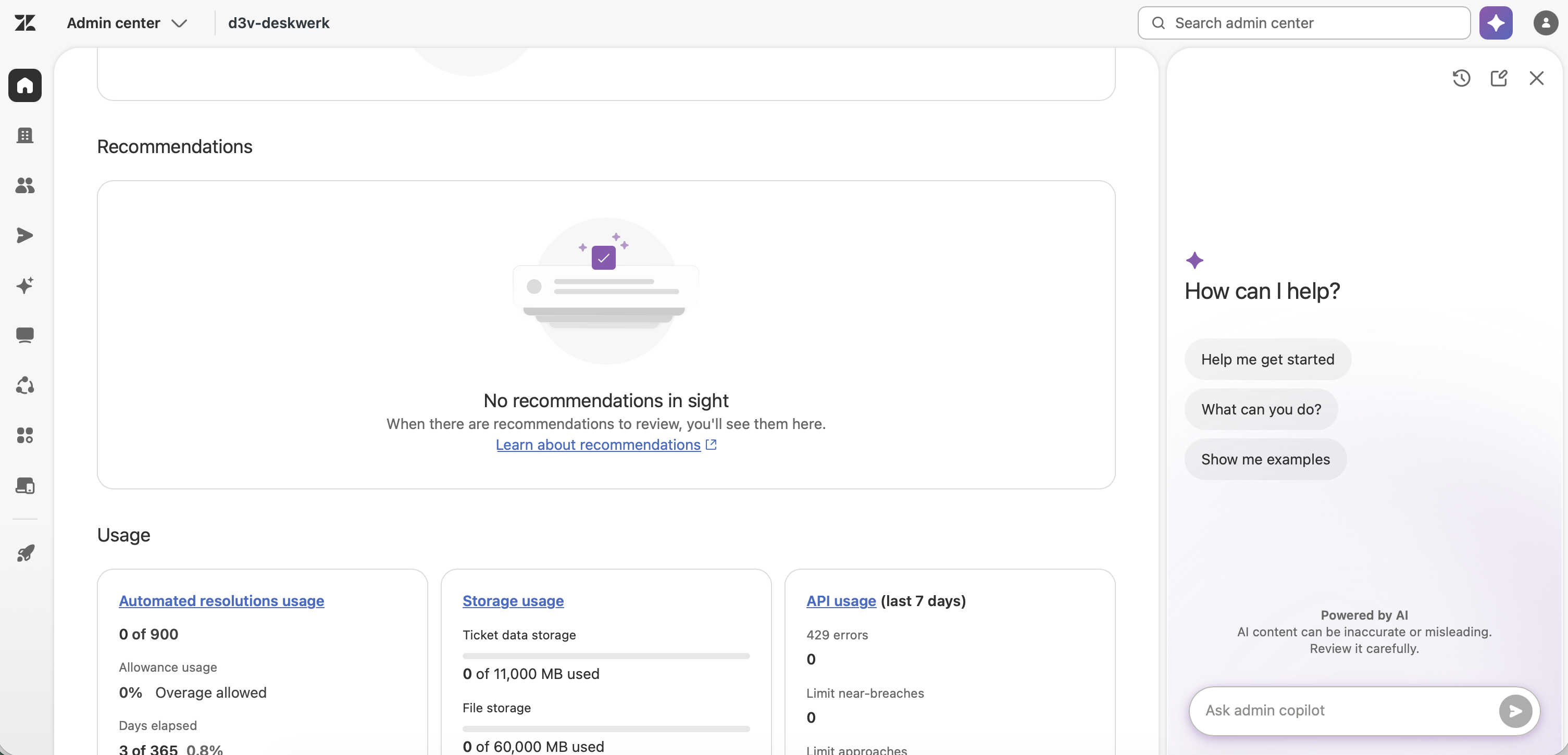
Zendesk describes it as a proactive AI assistant for admins. In practice it’s made of three building blocks:
- Weekly Digest (in the EAP it was called «Latest Insights»): a weekly analysis that names trends and risks in your account.
- Top Recommendations: concrete, prioritized suggestions tailored to your instance.
- Conversational Assistance: a chat, active by default, where you ask questions or describe a configuration and have it built: triggers, automations, SLA rules, views, custom objects. It also names the cause of a problem and points you to the matching Help Center articles.
Where it lives: insights and recommendations appear on the Admin Center home page; you reach the chat directly in the Admin Center.
The point where many people rightly flinch: it changes nothing on its own. Zendesk is unambiguous here: you have to review and confirm every change in a preview before it’s applied. Every suggestion is a draft you review, confirm, or discard. This is not autopilot, but it is co-pilot.
The preview, though, is not an undo button. On Enterprise you try a change out in the sandbox first; on Professional it runs straight in production, where only a snapshot of your configuration protects you if a suggestion turns out not to fit. Every adoption also carries your name: the admin audit log records who confirmed which recommendation. With the Trust and Safety suggestions in particular, that trail matters.
Availability and price
Since the general-availability launch in May 2026, Admin Copilot has been included in Suite and Support from the Professional plan on, and without a separate Copilot allowance. Weekly Digest, recommendations, and the chat therefore cost you nothing extra. The only thing that costs money is the Copilot add-on: it unlocks three additional recommendation categories (further down) and requires active, configured intelligent triage.
What it recommends, and how you respond
The recommendations fall into roughly seven categories; Zendesk keeps expanding the list, so the number is a snapshot.
- Workflow management: unused or duplicate triggers, automations, and macros to deactivate, spotted from the usage data.
- Omnichannel routing: pointers on capacity rules and routing queues.
- Macro content: new or reworked macros, derived from how agents resolve cases.
- Trust and Safety: missing security controls such as 2FA, or inactive agents.
Three further categories require the Copilot add-on and rely on intelligent triage (which has to be active and configured for this):
- Task automation: triggers and autoreplies based on intent, sentiment, language, and detected entities.
- Auto assist configuration: for instance procedures with a high adoption rate.
- AI-generated procedures: new procedure drafts to review.
You respond per suggestion: accept it via an action button (which takes you, for example, to a pre-filled «Create trigger» page), Dismiss it with feedback, or mark it done after you’ve implemented it. The feedback feeds the Copilot’s learning loop, so it’s worth briefly naming the reason. Both dismissed and completed items go to the archive, so they’re not gone.
Data protection and revDSG
For running things in Switzerland, what matters is what happens to the data the Copilot analyzes. Zendesk states that it does not pass customer data to third parties for model training and that it operates the AI features on the principle of data minimization. Whether your data feeds into training is under your control: model training can be switched on and off per account. For hosting, Zendesk offers regions in the EU and in Germany; there is no Swiss region. Anyone working under the revDSG should settle the data region and the training opt-out before the Copilot runs on the production instance.
Where this leaves you
Admin Copilot doesn’t replace an admin, it takes the searching off your plate. Its value is in the hygiene: finding dead objects, showing redundancies, flagging routing gaps. The quality of the suggestions rests on your data, and the best part sits behind the add-on together with intelligent triage. Treat every recommendation as a hypothesis, not an instruction: review it, understand it, then confirm. That’s what the confirmation step is for.